Setting destination phone numbers
When your notifications are triggered, our notification dispatcher uses the Wialon API to retrieve a list of destination phone numbers.
Phone numbers retrieved from custom field and/or attached driver are combined into a list by the notification dispatcher. Duplicate phone numbers are discarded during this combination step.
Each destination phone number recieves a message, i.e. one notification trigger with three destination phone numbers is counted as three messages.
Important
All phone numbers must be in E.164 format. Example: +17135555555
Note
Our notification dispatcher caches data retrieved from the Wialon API for 5 minutes.
If you update custom field to_number or attach/detach a driver, you may have to wait up to 5 minutes before those changes are reflected by our notification dispatcher.
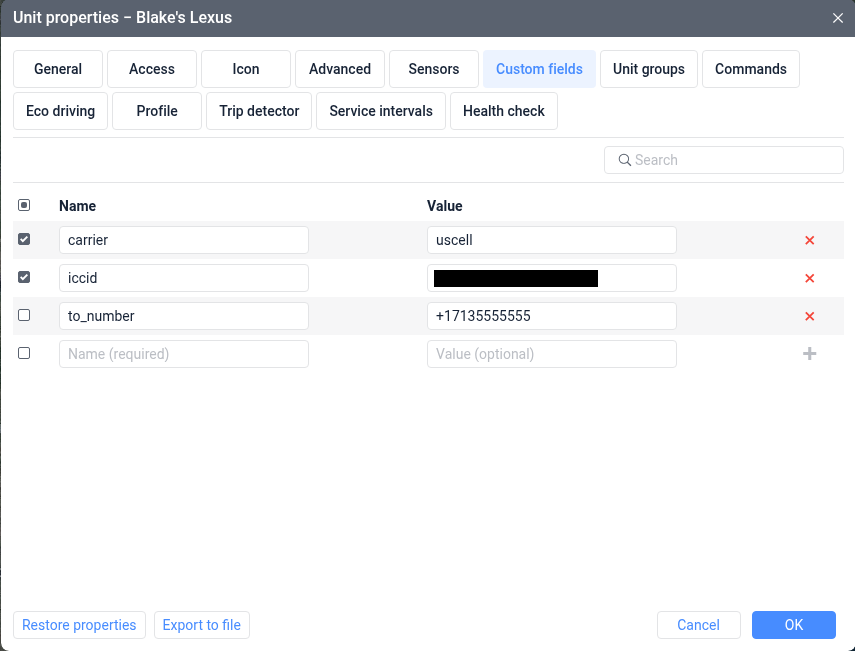
Custom field
If the triggering Wialon unit has a custom field of key to_number, its value is retrieved for delivery.
The value of this custom field may be a single E.164 formatted phone number or a comma-separated list of E.164 formatted phone numbers.
ACCEPTABLE:
+17135555555+17135555555,+18325555555
UNACCEPTABLE:
7135555555713-555-5555+17135555555 +18325555555
Attached Driver
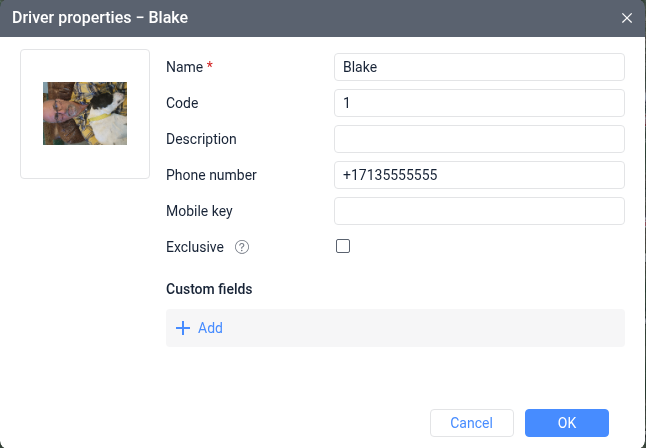
If the triggering Wialon unit has an attached driver, the attached driver phone number is retrieved for delivery.
As with custom field, driver phone number must be in E.164 format.